
Recruitment operations
Email Recruiting Workflow: From Inbox to Hire
By Andre · · 12 min read
Email Recruiting Workflow: From Inbox to Hire
An email recruiting workflow is the set of steps that takes an application from the moment it lands in your inbox to a decision the candidate hears about: capture, sort, record, review, reply, and retain or delete. The teams that run it well do three things consistently. They get every CV into one searchable place, they answer every candidate on a schedule, and they keep clean records. If your applications arrive in a shared mailbox, RecrutFlo connects to that mailbox, picks out the CV attachments and turns them into searchable candidate profiles, so the first and most error-prone step stops being manual.
TL;DR
- A workable workflow has six stages: capture, sort, record, review, communicate, retain or delete.
- Most lost candidates are lost at capture and record, when CVs sit in an inbox thread and nobody owns them. Fix those two first.
- Send a short, fixed set of messages: acknowledgment, interview invitation, status update, rejection, offer.
- In the US, employers must keep hiring records for at least one year under federal rules, so deleting by habit is not a plan.
- Automate the repetitive parts (intake, parsing, duplicate checks) and keep the hiring decision with a person.
Table of Contents
- Why email-based hiring breaks down
- The six stages of an email recruiting workflow
- The messages to send at each stage
- What to automate first
- Privacy and record-keeping
- A worked example
- We think the inbox is not the problem
- Getting started with RecrutFlo
- FAQ
- Sources
Why email-based hiring breaks down
Email is where candidates already are. They reply to a job post, forward a CV from a recruiter, or write to a general address like jobs@. For a small team that is fine at five applications a week. At fifty, three problems appear.
Missed applications. A CV arrives in one person’s inbox while that person is on leave, or it is buried in a thread about something else. Nobody notices until the candidate has accepted another offer.
Duplicates. The same person applies twice, or applies once directly and once through a referral. Two recruiters then contact them with different messages, which looks careless.
Information trapped in attachments. A PDF cannot be searched by skill, language or location. When a new role opens, the best candidates from last quarter are effectively invisible.
A workflow is the answer to all three. It does not need to be a heavy applicant tracking system (ATS, the software that manages the full hiring pipeline). It needs clear ownership and one place where candidate information lives.
The six stages of an email recruiting workflow
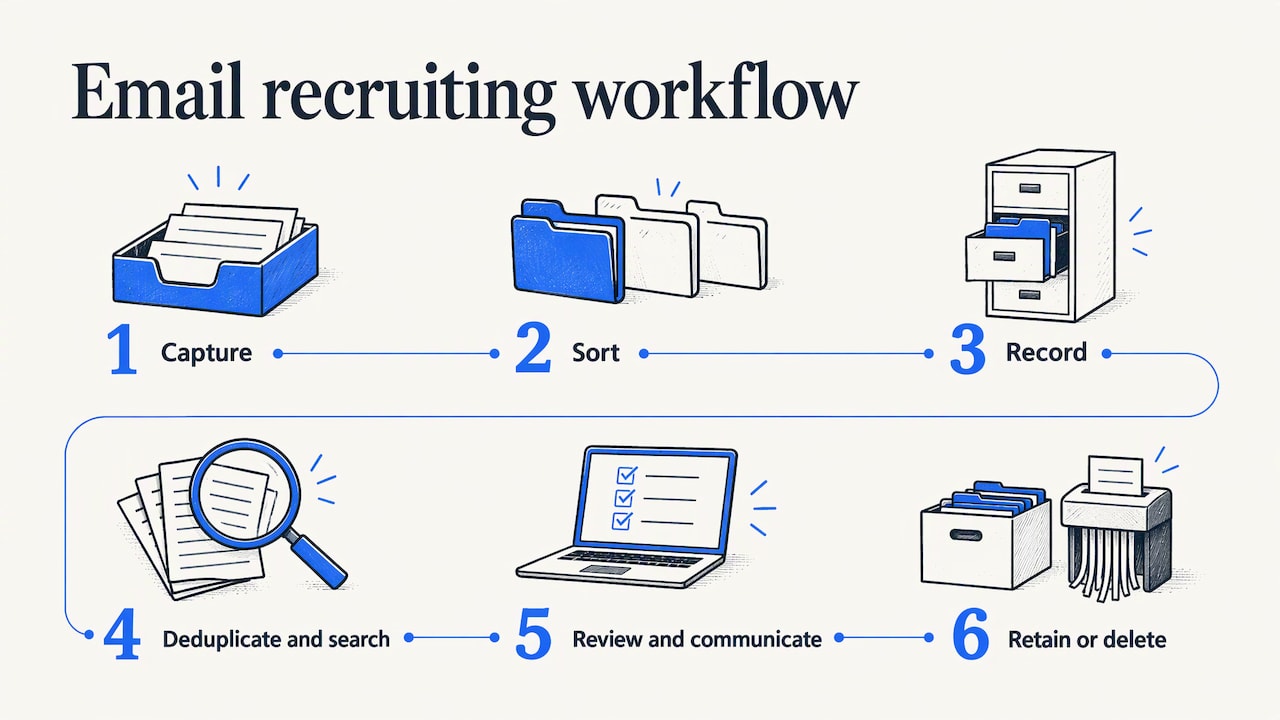
1. Capture: one inbox, one owner
Route every application to a single shared mailbox rather than to individuals. Use one address per purpose (for example, one for general applications and one per agency client if you run searches for others) and name one person responsible for checking that nothing is stuck there.
Where it goes wrong: people forward CVs from personal inboxes, so copies exist in three places and none is the master. Where RecrutFlo fits: it connects to Microsoft 365, Outlook and IMAP mailboxes (Gmail is coming soon), so you keep the inbox you already use instead of moving applicants onto a new platform, and it detects the CV attachments in incoming emails without anyone saving files by hand. There is no onboarding call or implementation project to schedule first. Our guide to automating candidate intake from your hiring inbox walks through the setup.
2. Sort: separate applications from noise
A hiring inbox collects applications, recruiter pitches, newsletters, out-of-office replies and candidate questions. Decide the rules in advance: what counts as an application (an email with a CV attached, or a reply to a specific posting), and where everything else goes.
Mailbox rules help here, and our walkthrough of Gmail filters for recruiting shows the logic of labels and conditions. The weakness of rules alone is that they depend on subject lines, and candidates rarely follow subject-line instructions. Detecting the attachment itself is more reliable than matching words.
3. Record: turn the CV into a profile
This is the stage that costs the most hours when done by hand: opening the file, copying name, email, phone, current role, skills, languages and location into a spreadsheet. It is also where typos creep in.
A structured profile should hold, at minimum:
- Contact details and location
- Current and past roles, with dates
- Skills and languages
- Salary expectations and availability, where stated
- The original CV file, linked to the profile
- Source (which mailbox, which posting) and date received
RecrutFlo parses PDF, DOC and DOCX CVs and extracts contact details, experience, skills, languages, location, role context, salary expectations and availability into a searchable candidate profile. That removes the manual data entry, and the original document stays attached to the profile, so the recruiter reviewing it still sees the real CV.
4. Deduplicate and search
Before anyone replies, check whether the person is already in your database. A name and an email address are usually enough to catch a repeat. Do this check every time, not only when someone happens to remember the name.
Then make the database useful: you should be able to search by skill, years of experience, language, location and role, not just by name. This is what turns last quarter’s applicants into this quarter’s shortlist. RecrutFlo flags duplicate candidates automatically and supports CSV export when you need to take a list into another tool or report. For agencies working a large pool, the staffing agency email workflow shows how this looks day to day.
5. Review and communicate
Review is where people make the decision, and it should stay that way. Automation can sort and organize; a recruiter should still read the shortlist. RecrutFlo is built to automate repetitive tasks while leaving control with the recruiter. For faster review habits, see how to improve resume screening time without missing good candidates.
Communication is covered in the next section, because it is the part candidates actually see.
6. Retain or delete
Every application becomes a record you must keep for a defined period and then dispose of. Covered in the privacy section below.
The messages to send at each stage
You do not need dozens of templates. Most teams need five, plus a couple of variants.
| Stage | Message | What it must include |
|---|---|---|
| Application received | Acknowledgment | Confirmation of receipt, the role applied for, a realistic timeframe for hearing back |
| Shortlisted | Interview invitation | Interviewer name and title, format, date and duration, location or video link, a reply-by deadline |
| After the interview | Status update | What happens next and when |
| Not progressing | Rejection | A clear decision, thanks, and whether you will keep their details for future roles (only with consent) |
| Selected | Offer | Role, pay, start date, response deadline |
Two practical points from public-sector hiring guidance are worth borrowing. Oregon State University’s HR office advises that written interview invitations should state a response deadline and explain what happens if the applicant does not reply. The same guidance says automated rejection emails are for pools too large for individual replies, and should not go out until the hiring manager has an accepted offer in hand. That timing rule protects you if your first choice declines.
The discipline matters more than the wording. A candidate who hears nothing for three weeks assumes the answer is no, and tells others. A short acknowledgment sent the same day costs nothing. We keep ready-to-adapt wording in our recruitment email templates for every hiring stage.
A simple rule keeps communication consistent: one person owns each candidate’s thread, and the profile records every message sent and when. That is how you stop two recruiters writing to the same candidate with different answers.
What to automate first
Not everything should be automated, and not all at once. A sensible order for a small team:
- Intake and parsing. The highest hours saved, the lowest risk, because no decision is made.
- Duplicate detection. Cheap, and it prevents embarrassing double contact.
- Acknowledgment emails. Predictable, and candidates value the speed.
- Search and shortlisting filters. Speed up the review without replacing it.
Leave the final screening decision and the rejection of borderline candidates to a person. Our piece on what small businesses should automate first covers the order in more depth.
A rough test for whether it is worth it: count the applications you handle in a month and the minutes each takes to read, copy and file. Multiply them and you have the hours you could recover. If the number is a couple of hours, a spreadsheet may do. If it is a working day or more, intake is the place to start.
Privacy and record-keeping
Candidate CVs contain personal data: addresses, phone numbers, sometimes dates of birth and photos. Treat the shared inbox accordingly.
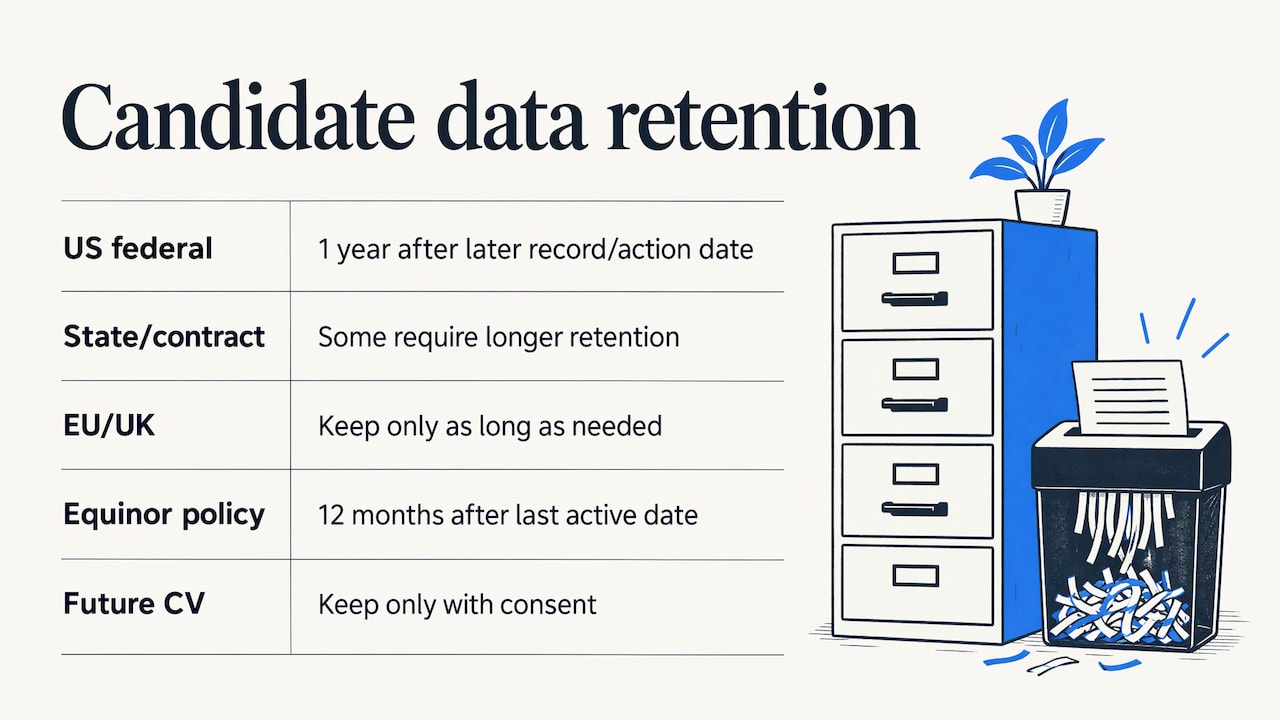
Keep records long enough. For US employers, federal regulation requires that application forms and other hiring records be preserved for one year from the date the record was made or the hiring action taken, whichever is later. Some states and contracts add longer periods, so confirm the rule that applies to you with your employment lawyer or HR adviser.
Delete on a schedule. If you hire in the EU or UK, or receive applications from there, data protection law pushes the other way: do not keep data longer than needed. Corporate policies show how this looks in practice. Equinor, for instance, states that it keeps applicant data for 12 months from the last active date and keeps a CV for future openings only with consent. A written schedule is the way to satisfy both; this data retention policy template is a useful starting structure for an EU small business. Our GDPR recruitment compliance guide and the note on what to log in an audit trail go into the detail.
Control who sees what. Not everyone on the team needs access to every profile. RecrutFlo offers team access control, workspace isolation and an audit trail, and its approach to candidate data is built around EU data protection principles. For a team, that means a record of who opened or changed a profile, instead of a mailbox everyone can read and nobody can account for.
This section is general information, not legal advice. For retention periods in your state or for cross-border hiring, ask your employment lawyer.
A worked example
Take a five-person agency receiving about 200 CVs a month across three open roles, all to one shared mailbox.
Under the manual routine, a coordinator spends roughly five minutes per CV reading, copying details and filing, so about 16 hours a month, and duplicates slip through when two people handle the same day’s mail. Replies go out when someone remembers.
Under the workflow above, the mailbox is connected, CVs become profiles on arrival, duplicates are flagged, and the coordinator’s time goes to reading the shortlist and writing to candidates. The five-minute figure is an assumption for illustration; measure your own before you decide.
We think the inbox is not the problem
Most teams assume they need to leave email to hire properly. We disagree. Candidates write to inboxes, clients forward to inboxes, and your team already knows how to work in one. What is missing is not a new platform but a layer that reads what arrives and organizes it.
That is why we built RecrutFlo to connect to the mailbox you already have, with no onboarding call and no implementation project, and why pricing and plan limits are published rather than quoted on a sales call. A small team should be able to start on a free plan and see the workflow run on its own CVs.
We also believe the recruiter stays in charge. Automation should read, extract, flag duplicates and make search fast. The decision to call someone, and what to say, remains human.
Marco
Getting started with RecrutFlo
RecrutFlo is subscription software priced by usage volume. You can test the workflow on the Free plan, then move to Starter at 19 € per month, Professional at 49 € per month or Business at 149 € per month as your volume grows. If you need extra capacity, additional CV processing runs are sold one-off: 9 € for 100, 29 € for 500 and 49 € for 1,000. See the plans on the pricing page, or read how it works first.

If your applications already arrive in a shared inbox, RecrutFlo is built for exactly that setup.
FAQ
What is the first step in an email recruiting workflow?
Route all applications to one shared mailbox with a named owner. Until every CV lands in one place, nothing downstream (sorting, deduplication, replies) can be reliable. Then decide what counts as an application so the rest of the inbox does not clutter it.
How long should we keep CVs from unsuccessful candidates?
In the US, federal rules require keeping hiring records for at least one year, and some states or contracts require more. If you also process applications from the EU or UK, set a shorter, documented schedule and keep CVs for future roles only with consent. Confirm your specific obligations with an employment lawyer.
Should we send automatic rejection emails?
They are reasonable when the applicant pool is too large for individual replies. Timing matters: hold them until your chosen candidate has accepted an offer, so you keep a fallback. Candidates who reached an interview deserve a personal message.
Do we need a full ATS to run this workflow?
Not necessarily. If your applications arrive by email, a searchable applicant database fed from the inbox covers capture, records, duplicates and search, which is most of what a small team needs. RecrutFlo is designed as a simple, affordable alternative to a traditional ATS for that case.
Sources
- Communicating with Applicants, Oregon State University Office of Human Resources
- 29 CFR 1602.14, Preservation of records made or kept (eCFR)
- General Privacy Policy for Recruitment, Equinor